UT Tyler's Online Tools for Nursing Students
Most of a UT Tyler nursing program runs through five places: your Patriot Account, myUTTyler, Patriot Email, Canvas with the Mission Possible orientation, and the exam tools your syllabus names. Clinical placement, compliance and hour logs sit apart from all of them, in Exxat.
Let us handle the preceptor search
You manage Canvas and exams. Your placement advisor finds the preceptor and prepares the Self-Placement Request details.
Activate your Patriot Account first
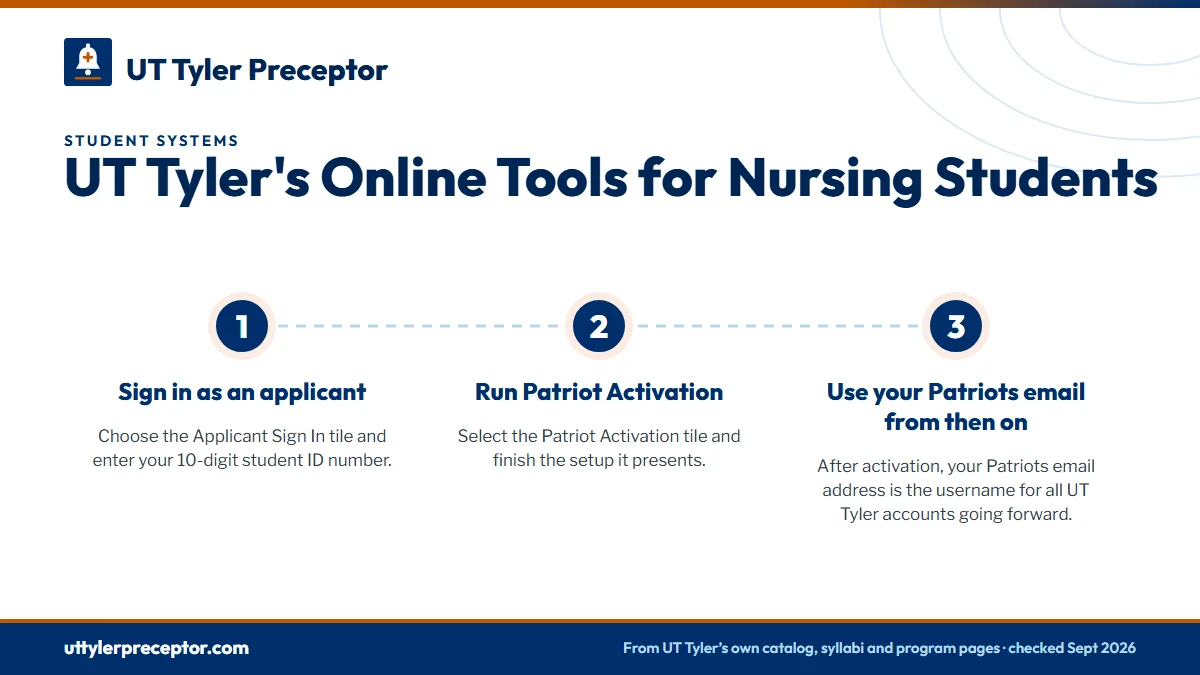
Your Patriot Account is the key to every other UT Tyler system, and myUTTyler stays locked until it is active. New students set it up from the myUTTyler sign-in page in three moves.
- Sign in as an applicantChoose the Applicant Sign In tile and enter your 10-digit student ID number.
- Run Patriot ActivationSelect the Patriot Activation tile and finish the setup it presents.
- Use your Patriots email from then onAfter activation, your Patriots email address is the username for all UT Tyler accounts going forward.
UT Tyler's style guide spells the portal "my UTTyler" and asks that nobody shorten it to MUTT. Most university pages, and this site, write myUTTyler. If activation stalls, UT Tyler's Technology Support desk is the place to turn, and it is covered further down this page.
What lives in myUTTyler
myUTTyler is UT Tyler's student information system. The Student Center is where you register and where drops happen before a session starts. Once classes begin, changes move to Manage Classes: Withdrawal Portal. Account Inquiry is where graduate nursing students can buy the nursing badge required at clinical sites.
Course and faculty evaluations also open through myUTTyler, run by the Office of University Assessment. Preceptor and facility evaluations are a different matter: they belong to your clinical course faculty and the facility, and students complete them in the clinical placement software.
Degree planning tools in myUTTyler
- Patriot Advisement Report (PAR): the official online degree plan for undergraduates.
- What-If Report: a view of how your record would fit a different program.
- Patriot Planner: a multi-semester plan.
- GPA Calculator.
Graduate nursing students plan differently. You and your advisor sign a degree plan before the end of your first semester, and that signed plan is the reference for your MSN or doctoral sequence.
Patriot Email is the official channel
Every admitted student receives a Patriot Email address, and UT Tyler treats it as its official way of reaching you. The student email policy also works in reverse: messages you send from any other account are not considered official student communications.
For a nursing student, that inbox carries real deadlines. The School of Nursing sends drug-screen notices to your Patriots email, and requests for your student ID and nursing badge must come from it. Mail runs in Outlook, linked from the Current Students page, so set it up on your phone before your first clinical term.
Clearance also arrives by email. Administration students wait for a Clinical Requirements Complete email from the Clinical Liaison before starting, and AGACNP students upload a Good to Go email for each approved site and preceptor. File those messages where you can find them again.
Canvas and the Mission Possible orientation
Canvas is UT Tyler's learning management system, and the Office of Digital Learning supports it. New students can take Canvas 101, an introduction to the platform. Your courses, syllabi, announcements and grades live there.
MSN students have one required Canvas site before any course: Mission Possible, the online MSN orientation. School of Nursing policy says you complete it before your first course. Mission Possible also holds the UT Tyler Preceptor Handbook, and the NURS 5349 syllabus expects you to hand each preceptor a copy and walk through it together.
NP syllabi add that details on the clinical placement software arrive in Canvas during the first week of the semester. Open every clinical course shell on day one, even if the course is mostly online.
Mission Possible is due before your first course, not during it. Finish it as soon as Canvas opens to you so the Preceptor Handbook is ready when a preceptor asks what UT Tyler expects.
Exam and board-prep tools
Your syllabus decides which tool a course uses. The Fall 2026 NP syllabi name Respondus for proctored exams, while the School of Nursing's computer requirements sheet, dated December 2023, names Examplify and ProctorU. Treat the syllabus as current and the sheet as the older reference.
| Tool | Where UT Tyler names it | Used for |
|---|---|---|
| Respondus LockDown Browser and Respondus Monitor | Fall 2026 NP syllabi | Proctored course exams |
| ProctorU Record+ | Fall 2026 NURS 5347 syllabus | Recorded proctoring |
| Examplify | School of Nursing computer requirements (Dec 2023) | Online testing |
| FNP Mastery and the APEA University Predictor Exam | Fall 2026 FNP syllabi | Required board-prep resources |
| ATI | BSN policies | BSN testing and review |
The university also runs its own Testing Center. For what happens after the program, the certification exam page covers the ANCC and AANPCB boards.
Advising, IDs and technology help
Advising appointments are booked through Civitas Learning Inspire, linked as Schedule an Advising Appointment in the Helpful Tools row of the Current Students page. That row also links Canvas, the library, email, the bookstore, P2 Money, Patriots Engage and Class Search. Graduate nursing students also work with a Graduate Nursing Advisor, who handles course-equivalency requests.
Your student ID is the P2 Card, also available as a Mobile P2 Card, issued by the Student Cashiers Office in STE 230. Graduate nursing students need both the P2 Card and a separate nursing badge.
For technical trouble, Technology Support sits in USC 118 and offers live Zoom help through the HelpNow Service Portal. Canvas questions go to the Office of Digital Learning. Who does what lists the clinical roles, from course faculty to the Clinical Coordinator.
Where Exxat and your preceptor search fit
Clinical placement runs outside all of these tools. Graduate nursing moved compliance and clinical management to Exxat starting in Spring 2024, though some syllabi and pages still show InPlace. The Exxat page walks through that transition and what you file there.
Exxat records a placement once you have one. The Self-Placement Request asks for details from a preceptor who has already agreed, and securing that agreement is the part the placement desk takes on. Your placement advisor finds a Texas preceptor who fits your exact course, collects everything the Self-Placement Request needs, and keeps facility onboarding moving while you focus on Canvas and exams. If a preceptor cancels mid-term, we find a replacement and prepare the new details for faculty review. Start with the request form.
Questions UT Tyler students ask
Can I use a Mac or Chromebook for UT Tyler nursing exams?
The School of Nursing's computer requirements sheet from December 2023 asks for Windows 10 or later with a webcam and rules out tablets, Mac OS devices and Chromebooks. Fall 2026 NP syllabi now name Respondus for proctoring, so confirm with your course faculty well before the first exam instead of assuming either answer.
How do I get a UT Tyler nursing badge?
Graduate nursing students need a nursing badge in addition to the P2 student ID. Request both by email from your Patriot account, following the School of Nursing's ID and badge instructions, or buy the badge in myUTTyler under Account Inquiry. The NP preceptor guide expects proper attire with a UT Tyler name badge at every clinical site.
Is Exxat part of Canvas or myUTTyler?
Neither. Exxat is a separate clinical platform that graduate nursing students keep an active subscription to, and NP syllabi say setup instructions arrive in Canvas in the first week. Compliance items, placement forms and clinical hour logs go into Exxat, while coursework and grades stay in Canvas.
Can I email UT Tyler faculty from my personal account?
Not for anything official. UT Tyler's student email policy says messages from any account other than Patriot Email are not treated as official student communications. Use your Patriot address for faculty, advisors, the Clinical Coordinator and ID requests, and read it daily while clinical clearance is underway.
Is UT Tyler's Catalog system the same as the course catalog?
No. UT Tyler describes Catalog as its platform for continuing education courses and programs, separate from the Canvas courses of your degree. Program rules, course descriptions and graduate policies are in the 2026-27 academic catalog, which is the document to cite when a requirement is in question.
Related pages
Last checked 2026-09-25
We check these pages against UT Tyler's own catalog, syllabi, program pages and clinical policies, and Texas rules. Your course, your program coordinator and the Clinical Coordinator have the final word.
UT Tyler asks you to choose your clinical site. We find it.
Tell us your UT Tyler track, where in Texas you live and when your next clinical course starts. We find preceptors near you who fit the course and gather everything your Self-Placement Request needs, so faculty can approve it before the semester.
- Preceptors matched to the course: pediatrics for
NURS 5453, adult and geriatric care forNURS 5455, psychiatric care forNURS 5367 - Texas-licensed preceptors who clear UT Tyler's supervisor, relative and site rules
- Anywhere in Texas, from the Piney Woods to the Valley
Start your placement plan
Program, city and start date is all we need to begin.